
Muse can't shop Amazon anymore. Claude Code can, 1.8x faster and 1.6x cheaper with pre.dev
Amazon blocked Meta's Muse. A local agent in your own Chrome is a different story: with the open source pre.dev MCP, Claude Code hunted the deals left after Prime Day 1.8x faster and 1.6x cheaper than with Claude in Chrome, and every price it cited checked out. Try it with one command.

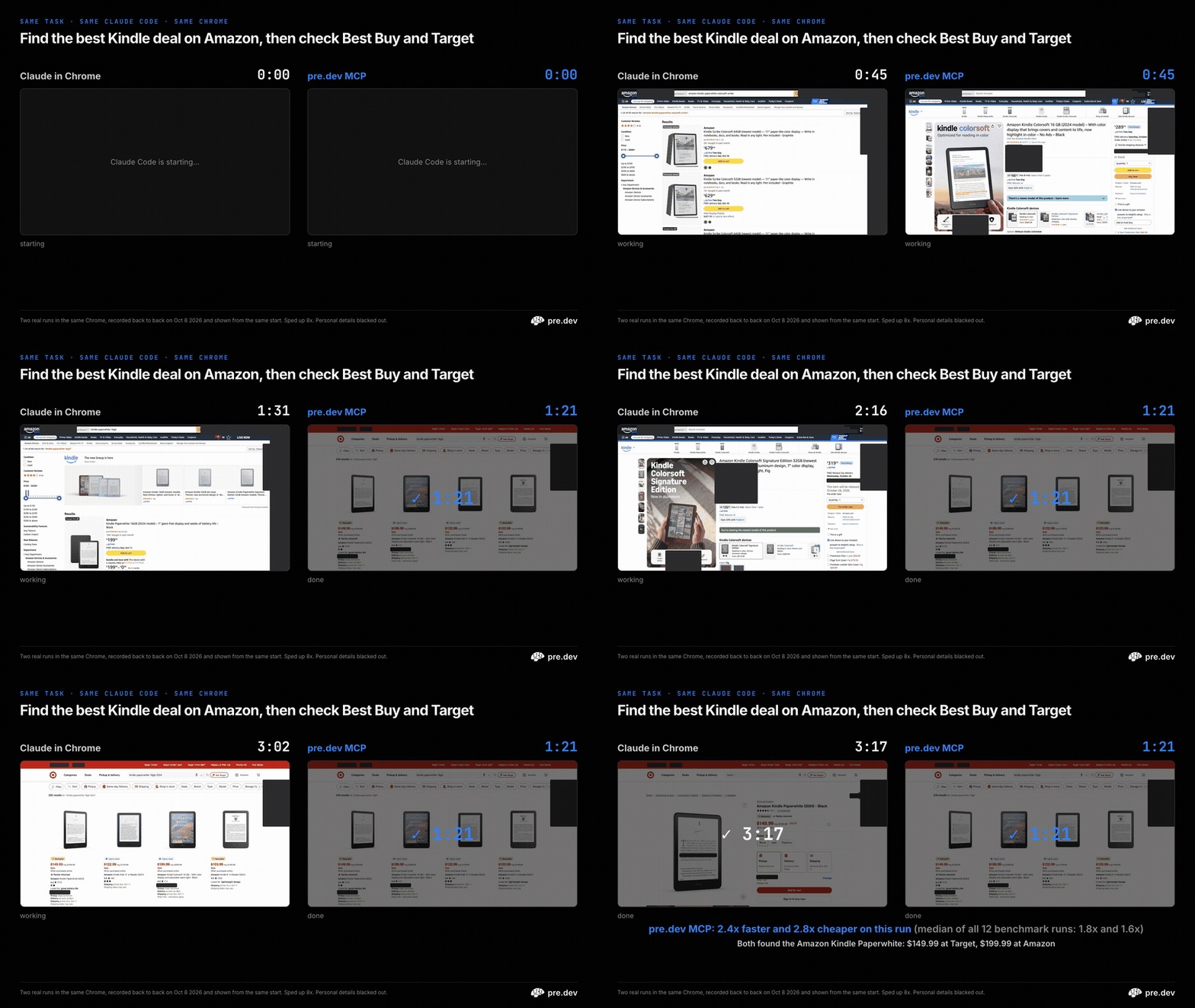
Can't get your personal AI agent to shop Amazon for you? The coding agent already on your laptop can. With the pre.dev MCP, Claude Code found the best deals left after Prime Day and checked them against Best Buy, Walmart and Target 1.8x faster and 1.6x cheaper than with Claude in Chrome. Same agent, same model, same Chrome, same tasks.
The results in 10 seconds
- 1.8x faster and 1.6x cheaper per task, and it finished first in 12 of 12 head-to-head runs
- 12 of 12 runs completed; every price it cited checked out on the live store page
- No store showed it a bot check: not Amazon, Best Buy, Walmart or Target
- It never touched the cart. It finds the deal; the buy button stays yours
Try it in 60 seconds
Open a terminal and run:
npx -y @predotdev/mcp setupRestart Claude Code (or Codex, Cursor, Hermes, Pi and 20+ other agents)
Ask: "Find the best deal on noise-cancelling headphones on Amazon, then check Best Buy and Walmart."
You need a Mac with Google Chrome and Node.js 22 or newer. Setup walks you through turning on remote debugging in Chrome; when Chrome asks Allow remote debugging?, click Allow. Signing in to pre.dev comes last and is optional: press Enter to skip. No coding agent? Install the pre.dev CLI with curl -fsSL https://pre.dev/install | bash, sign in when your browser opens, then type /chrome.
Amazon blocked Muse, a cloud agent. A local agent shops as you.
Amazon started blocking Meta's new Muse assistant from its store on September 20, less than two weeks after Muse launched. Amazon's spokesperson said apps that buy on a customer's behalf "should operate openly and respect service provider decisions about whether or not to participate" (GeekWire, Reuters via The Star). It has also moved to block shopping agents from Google and OpenAI (The Register). And it isn't only Amazon: people using personal agents report blocks at eBay, Zillow, airlines and more, and one said Google kicked Instinct out while it was cleaning up their Gmail (TechCrunch).
Muse is a cloud agent: each user gets a virtual machine in the cloud with its own browser, and their logins go into Meta's secure storage (VKTR). A local agent works the other way. It drives the Chrome on your own computer, the one you're already signed in to, so it shops as you, with your profiles and your Prime account.

So the day after Prime Big Deal Days (October 6 and 7), we gave Claude Code the job people actually want from a shopping agent: find the best deal still live on Amazon, then check whether Best Buy, Walmart or Target has the same thing for less. We ran it with two local browser tools, Anthropic's Claude in Chrome and the open source pre.dev MCP: 4 shopping tasks (headphones, a 65-inch TV, a robot vacuum and a Kindle), 3 runs each.
What they found

The deals still standing the day after Prime Day told a simple story. Headphones and TVs cost the same at Amazon, Best Buy and Walmart, give or take $2. Robot vacuums were cheapest at Amazon or tied: the Shark PowerDetect NeverTouch was $399.99 there, $599 at Walmart and $899.99 at Best Buy. Kindles were back to full price at Amazon, and Target had every one the agents checked for less: the Paperwhite for $149.99 against $199.99, and the Colorsoft 16GB for $189.99 against $289.99 (Amazon lists its Colorsoft as the 2024 model, Best Buy as 2025, and Target doesn't say).
Every price an agent cited, we re-opened on the live store page after the run and checked it was there. All of them checked out: 34 of 34 for the pre.dev MCP and 35 of 35 for Claude in Chrome (one Target price needed a second look).
Faster on every task
The recording at the top is a separate pair of runs, faster than most. Here are all 12 benchmark runs on each side: add up each task's median run and the 4 tasks took 5:20 with the pre.dev MCP and 9:30 with Claude in Chrome.
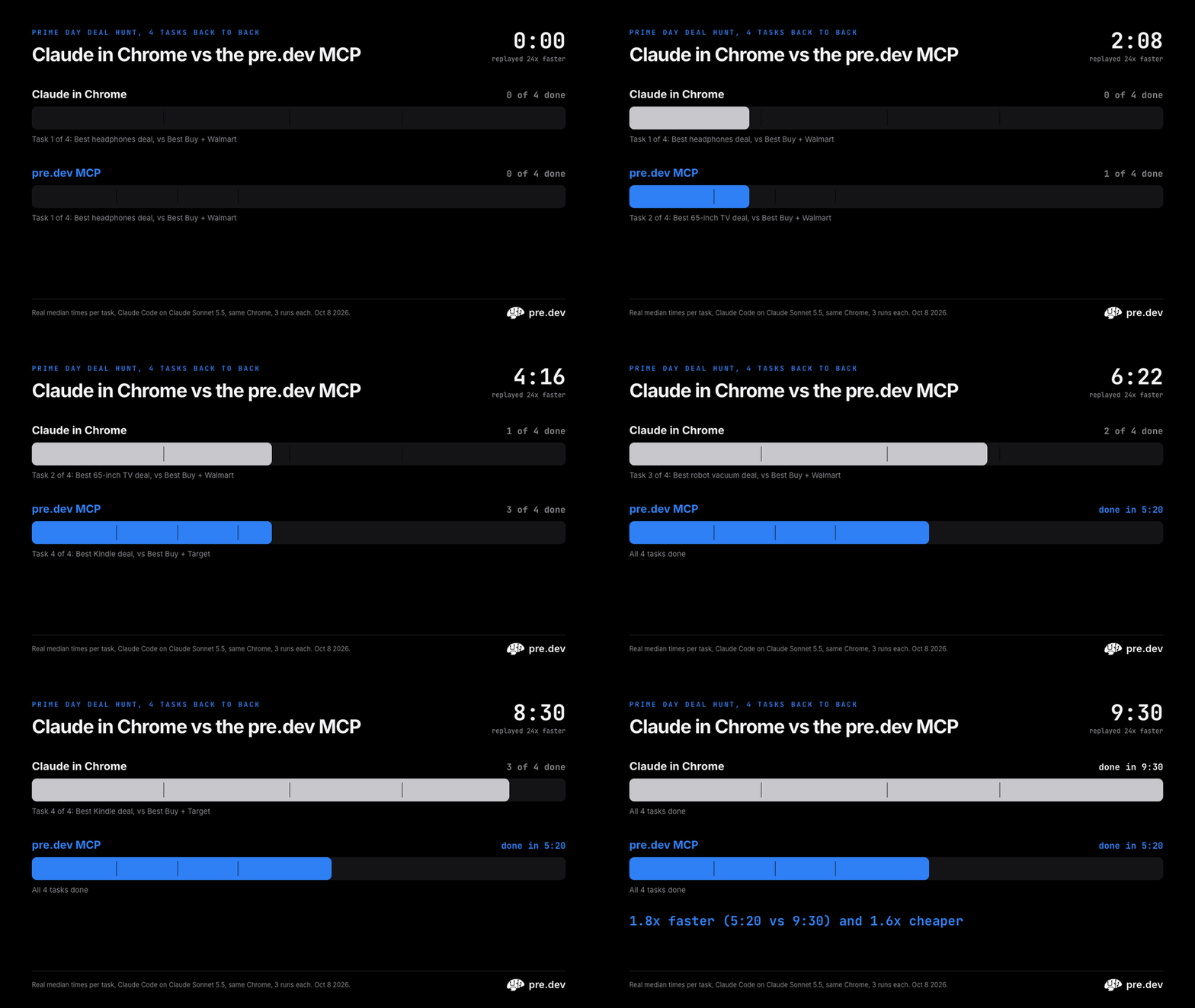

The pre.dev MCP was faster on all 4 tasks, from 1.6x to 2.1x. Head to head, it finished first in 12 of 12 matchups. Add up every run and 30 min 38 s of shopping became 16 min 24 s, 1.9x faster on totals.

Cheaper on every task

All 12 runs on each side cost $4.48 with Claude in Chrome and $2.91 with the pre.dev MCP (1.5x on totals), at the API prices Claude Code reports.
Why it's faster

- It reads the page instead of looking at it. The pre.dev MCP hands the agent the page as text, with a ref like
e13on every button and link. Claude in Chrome reads text too, but its agent also took 40 screenshots across its runs. The pre.dev side took 0. - Fewer steps. 224 tool calls in total against 322. Claude in Chrome's agent also started every run by checking its tab group (12 of 12 runs) and loaded its browsing skill in 9.
No coding agent? The pre.dev CLI does it too
Install the pre.dev CLI, sign in when your browser opens, type /chrome, and ask (it needs Node.js 22 or newer). We gave its latest release the headphones task on its default model, in the same Chrome: it found the same Bose QuietComfort deal, $169 at Amazon, Best Buy and Walmart alike, in 122 seconds, and added nothing to a cart. (One run, outside the benchmark.)
curl -fsSL https://pre.dev/install | bash
Set it up in any agent
One command adds the server to the agents it finds on your Mac, connects to your Chrome, and then offers to sign you in to pre.dev (only the plain-words actions and cloud tools need that):
npx -y @predotdev/mcp setup
Then restart your agent and ask it to shop. The first time, turn on remote debugging at chrome://inspect/#remote-debugging (setup walks you through it). Chrome then asks Allow remote debugging?: click Allow.
Already using Claude in Chrome? Run the setup command above, then type /chrome in Claude Code and turn off Enabled by default (and drop --chrome if you start Claude Code with it). Claude Code asks before it uses a new tool the first time; the switching guide shows how to allow them all at once. Your Chrome profiles and logins carry over, because the pre.dev MCP drives the Chrome you already use. The switching guide has a tool-by-tool table and a prompt you can paste into your agent.
It works in Codex, Cursor, Hermes, Pi, OpenClaw and 20+ other agents too: setup for every agent. We built the pre.dev MCP with pre.dev itself.
How we tested
- Each run was a fresh
claude -psession on Claude Sonnet 5.5 with Claude Code's everyday tools on, except shell and web fetch/search, so every price had to come from the browser. One side had Claude in Chrome, the other the pre.dev MCP's Chrome tools. Both got the same prompt, which named no Chrome profile, and the sides took turns going first. - The prompt asked for the biggest discount rated 4 stars or more from named brands, the same model's price at the other two stores, the cheapest store and a product link for each. If nothing was discounted or a store didn't sell that model, the agent was to use the closest option and say so. Neither agent was allowed to add anything to a cart, and neither did.
- A run counts when the answer has an Amazon product link and a price for every store, or says the store doesn't sell it, plus a verdict. Every pre.dev MCP run counted (12 of 12); Claude in Chrome's did in 11 of 12, the miss being the store page its permission check declined. Times and costs include every run.
- Blocks. No store showed either agent a bot check in any of the 24 runs. Claude in Chrome's own per-site permission check, a safety setting in the extension, did decline an action on a Best Buy, Walmart or Target page in six of its 12 runs ("Permission denied ... on this domain"), intermittently: the same sites were readable in its other runs. Most of those runs found the price another way, and one came back without Walmart's price. The pre.dev MCP completed all 12.
- Your account, your terms. A local agent acts on your own account, so each store's terms apply to it just as they do to you. Being local isn't a free pass on its own: Amazon also sued Perplexity over its Comet browser, though in August an appeals court lifted Amazon's injunction there, saying it was the Comet user, not Perplexity, who was accessing Amazon; the case is ongoing (Engadget).
- How we compare. Each task's time and cost is the median of its 3 runs; each headline ratio is the median of the 4 per-task ratios. The race adds up each task's median run. Cost is what Claude Code reports at API prices. The recording at the top is a separate pair of runs of the Kindle task (one per side, recorded back to back), with each side's tab captured twice a second.
- Versions: Claude Code 2.1.294 and 2.1.295 (it updated itself mid-run), Claude in Chrome extension 1.0.98,
@predotdev/mcp2.1.4 (the recording at the top used 2.1.5), October 8, 2026.
Prices change by the hour, so treat the deals as a snapshot from October 8.


