
We made Claude Code 2x faster and 1.8x cheaper in Chrome
Same agent, same model, same Chrome. Swapping Claude in Chrome for the open source pre.dev MCP, which we built with pre.dev, made Claude Code 2x faster and 1.8x cheaper on browser tasks in our tests. Here's the data, and how to set it up in Claude Code, Codex, Hermes, Pi or any other agent.

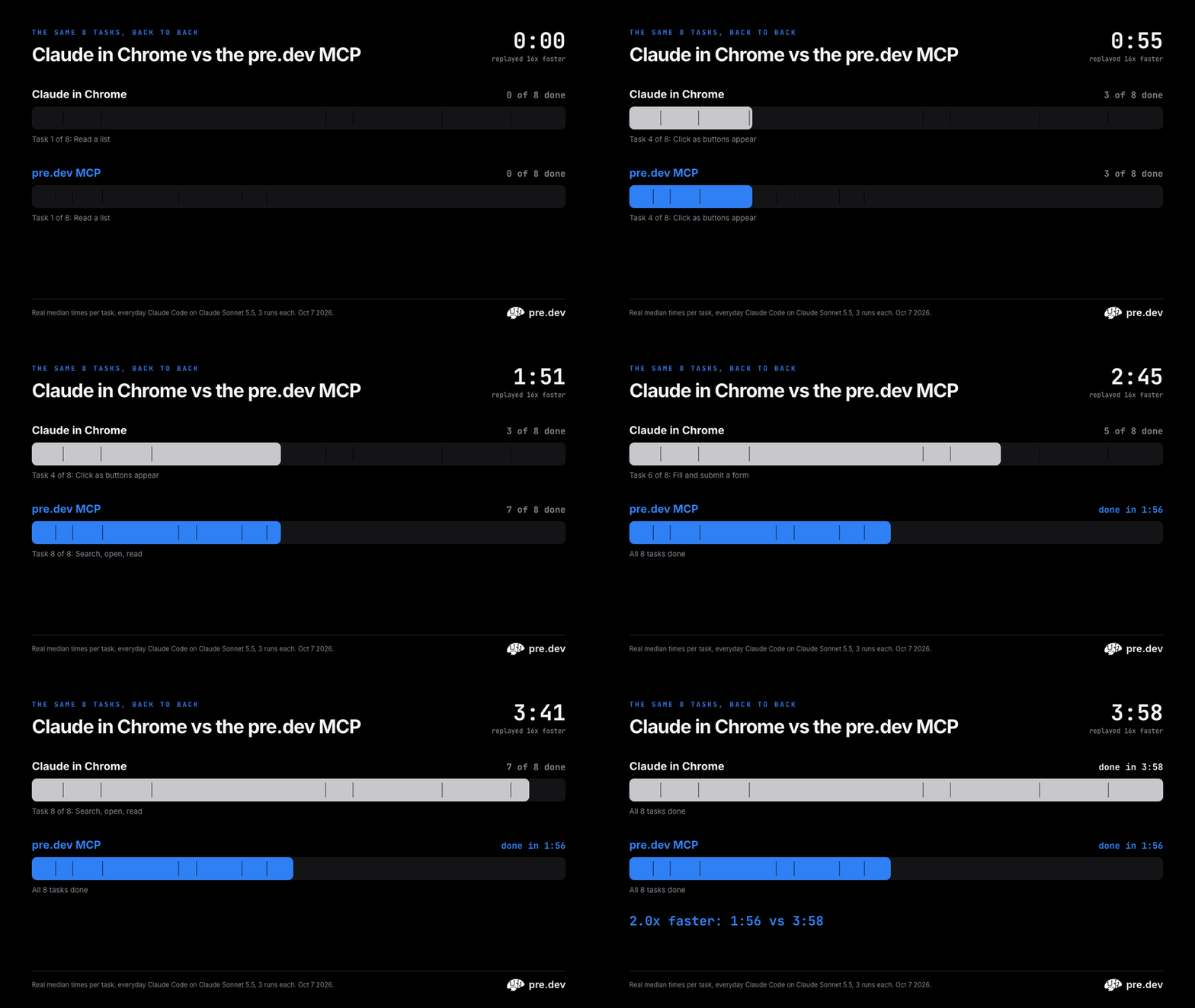
Swap Claude in Chrome for the pre.dev MCP, and Claude Code gets 2x faster and 1.8x cheaper on browser tasks. Same agent, same model, same Chrome.
Coding agents are getting good at using a browser: reading a dashboard, filling in a form, checking the page they just built. When an agent does that work, a lot of the wait isn't the model thinking. It's the browser tool.
So we raced two of them. Same agent (Claude Code), same model (Claude Sonnet 5.5), same Chrome, the same 8 everyday tasks, 3 times each. The only thing we changed was the browser tool: Anthropic's Claude in Chrome, or the pre.dev MCP, our open source one, which we built with pre.dev. (Its Chrome tools are free; its plain-words actions and cloud runs use pre.dev credits.)
Add up each task's median run and the 8 tasks took 1:56 with the pre.dev MCP and 3:58 with Claude in Chrome. Both got every task right, every time.
Faster on every task

The pre.dev MCP was faster on all 8 tasks, from 1.3x on reading a list on Hacker News to 2.8x on browsing three pages of a store.


Not a fluke
Medians can hide a lot, so here is every single run.

Head to head, the pre.dev MCP finished first in 22 of the 24 matchups. One of its two losses was a run where the agent chose pre.dev's cloud browser instead of the local Chrome.

It adds up
All 24 runs added up: about 12 minutes of browser work became about 6.

It was cheaper on every task too: $2.47 against $1.28 for all 24 runs at API prices, because the agent spends fewer, smaller steps getting the same answer.

Why it's faster
- It reads the page instead of looking at it. The pre.dev MCP hands the agent the page as short text, with a ref like
e13on every button and field. Claude in Chrome also reads text, but its agent took 17 screenshots in 6 of its 24 runs and sometimes clicked by pixel position. - Less waiting outside the model. Across the 24 runs, the time spent outside the model (browser tools and startup) was 349 seconds with Claude in Chrome and 95 with the pre.dev MCP.
- Fewer steps to get going. The pre.dev MCP opens a page in any of your Chrome profiles in one call. Claude in Chrome's tools ask the agent to set up its tab group first, which it did in 18 of 24 runs.


Built with pre.dev
We built the pre.dev MCP with pre.dev itself. pre.dev's coding agent, in the pre.dev CLI and on the web, built it with us and kept iterating on it until it was this fast.
Want to build your own tools the same way? Install the CLI:
curl -fsSL https://pre.dev/install | bash
Then type /chrome in it, and it gets these Chrome tools too.
Set it up in your agent

One command signs you in to pre.dev (free), adds the server to the agents it finds on your Mac, and connects to your Chrome:
npx -y @predotdev/mcp setup
Then restart your agent and ask it: "List my Chrome profiles and the tabs I have open." The first time, turn on remote debugging at chrome://inspect/#remote-debugging (setup walks you through it). Chrome then asks Allow remote debugging?, and again after each restart: click Allow.
Already using Claude in Chrome? Run the setup command above, then type /chrome in Claude Code and turn off Enabled by default. Your Chrome profiles and logins carry over, because the pre.dev MCP drives the Chrome you already use. The switching guide has a tool-by-tool table and a prompt you can paste into your agent.
Prefer to add it yourself? It's one line in most agents:
Claude Code
claude mcp add --scope user predev -- npx -y @predotdev/mcp
Codex
codex mcp add predev -- npx -y @predotdev/mcp
Hermes
hermes mcp add predev --command npx --args -y @predotdev/mcp
(answer Y to turn on its tools)
Pi (0.99 or newer)
pi mcp add predev -- npx -y @predotdev/mcp
GitHub Copilot CLI
copilot mcp add predev -- npx -y @predotdev/mcp
OpenClaw
openclaw mcp set predev '{"command":"npx","args":["-y","@predotdev/mcp"]}'
Cursor, Windsurf, Antigravity, Cline, Kiro and other mcpServers files (desktop apps like Claude Desktop can't always find npx, so run setup for those: it writes full paths)
{
  "mcpServers": {
    "predev": { "command": "npx", "args": ["-y", "@predotdev/mcp"] }
  }
}
Any agent without MCP (Aider, scripts, anything that can run a command):
npx -y @predotdev/mcp tools
npx -y @predotdev/mcp call chrome_open '{"profile":"Personal","url":"https://example.com"}'
The pre.dev CLI: type /chrome.
Zed, Goose, Continue, OpenCode, VS Code, Gemini CLI, Qwen Code, Factory Droid, Amp and the rest are in the setup guide.
When Claude in Chrome is the better pick
The 8 tasks are public, read-only and text-heavy on purpose, so they don't test a few things Claude in Chrome does well:
- Visual work. Checking a layout or working in a canvas app needs eyes, and screenshots are central to how Claude in Chrome works.
- Guardrails. It has permission modes and a classifier that checks actions before they run.
- No Node.js. It's a browser extension, and it's already in Claude's apps on every paid Claude plan. The pre.dev MCP needs Node.js 22, and we've only tested it on macOS.

How we tested

Each run was a fresh claude -p session on Claude Sonnet 5.5 with one set of browser tools, the same prompt for both ("Use only your browser tools." and the task, naming no Chrome profile), no personal settings, and both sides alternating. A script checked every answer. We ran it twice: in an everyday Claude Code setup (the numbers above) and with nothing loaded but the browser tools, where the pre.dev MCP was 1.8x faster.

A few things worth knowing:
- Each run was a fresh session, so per-session setup counts every time. In one long session it's paid once.
- How we compare. Each task's time is the median of its 3 runs, each headline ratio is the median of the 8 per-task ratios. The race adds up each task's median run; the other totals add up every run.
- Cost is what Claude Code reports at API prices. It leaves out the few pre.dev credits the pre.dev side used: 3 plain-words actions and one cloud browser run.
- Permissions. Claude Code ran each side's browser tools without asking. We can't tell from the logs whether the extension's own action checks ran.
- Versions: Claude Code 2.1.292, Claude in Chrome extension 1.0.98,
@predotdev/mcp2.0.2, all on October 7, 2026.
The full method, every run's results and the harness to reproduce it are on GitHub, along with Anthropic's Claude in Chrome docs we checked our claims against.


