NEW: Build Your Project in predev Sprints
We introduced predev Sprints, allowing you to group tasks into a single coding agent session. Queue items from your Kanban board, run custom tasks with /sprint, and maintain tighter control over your build process before switching to Autopilot.
We are introducing predev Sprints, a feature that allows you to group tasks into a single coding agent session. Sprints give you granular control over how you sequence work and steer your coding agent. predev Sprints is now live for all customers and projects.
How It Works
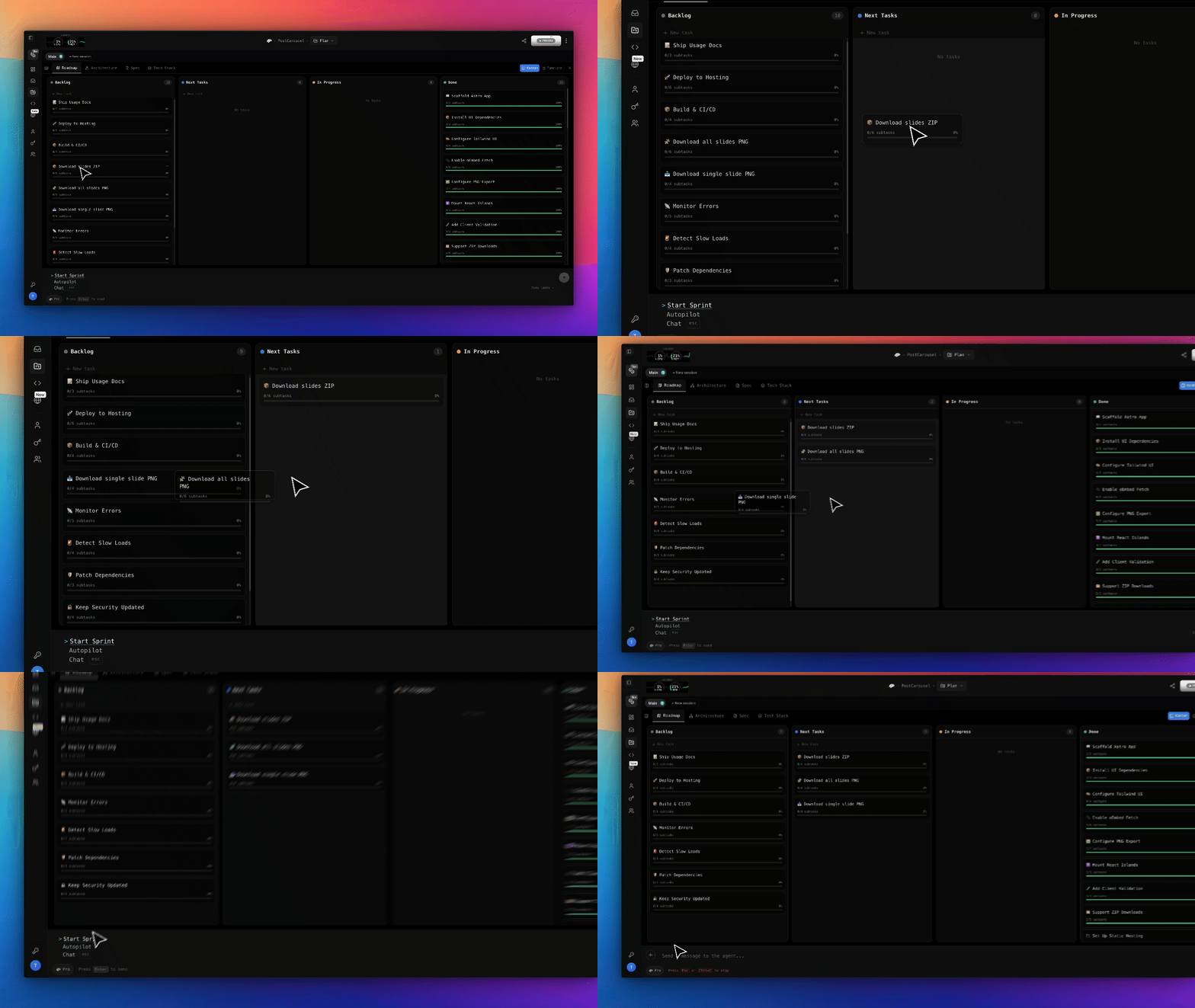
Organizing and executing a sprint fits directly into your project board workflow:
- Review Your Backlog: Open the integrated Kanban board to inspect items in your backlog and review their acceptance criteria.
- Refine the Scope: Use the chat interface to discuss, clarify, or adjust task requirements with the agent before execution.
- Queue Tasks: Drag selected tasks into the "Next Task" column. Alternatively, you can let the agent analyze your backlog and automatically pick the next logical set of tasks for you.
- Launch the Sprint: Select "Next Sprint" from the integrated terminal menu. The coding agent will move those tasks to "In Progress" and begin building.
Visit the predev docs for more details on predev Sprints.
Sprints vs. Autopilot
Autopilot remains available for hands-off development. In Autopilot mode, the agent moves through your entire roadmap sequentially without waiting for manual prompts. This makes it suitable for overnight builds, quick MVPs, or standardized tasks.
Sprints provide tighter steering. Running a few manual sprints early in a project allows you to establish context, guide the agent's design choices, and verify architectural decisions. Once the agent understands your project patterns, you can comfortably switch to Autopilot.
Bonus: Custom Sprints
If you need to execute work that is not on your roadmap, custom sprints allow you to bypass the Kanban board entirely.
Use the /sprint slash command in chat to trigger work on demand, such as quick refactors, vendor migrations, urgent fixes, or edits to previously completed tasks. The agent queues the request and runs it through a full execution cycle.
Head over to your predev project to try out Sprints today.
What’s Next
In our next post, we will cover advanced sprint configurations:
- Effort Levels: Adjusting sprint depth, from low-ceremony passes to full research-and-verification pipelines.
- Model Selection: Pinning specific models to individual phases of a sprint.
- Multi-Session Workflows: Running sprints across parallel agent sessions.
Let Us Know Your Thoughts and Feature Requests
We want to hear from you! We are incredibly excited to see what you build and learn how you are using In-Line Media Generation to accelerate your projects. Join the conversation and share your feedback over on our X and LinkedIn pages.
About predev
pre.dev is built to provide professional engineering teams with hyper-intelligent and cost-efficient coding agents. These agents deliver scalable, self-verifying, and model-agnostic software development.
Professional software development requires agentic coding that deeply understands system architecture, mitigates technical debt, and respects your compute budget.